
Inside the K1 CNC Upgrade: Control Screen & Menu Overview

With the K1 CNC Upgrade Kit installed, KUJIETOOL K1 transforms from a precision manual mill into a compact and capable desktop CNC milling system.
Below is an overview of how the CNC control interface works and what each part of the menu allows you to do.
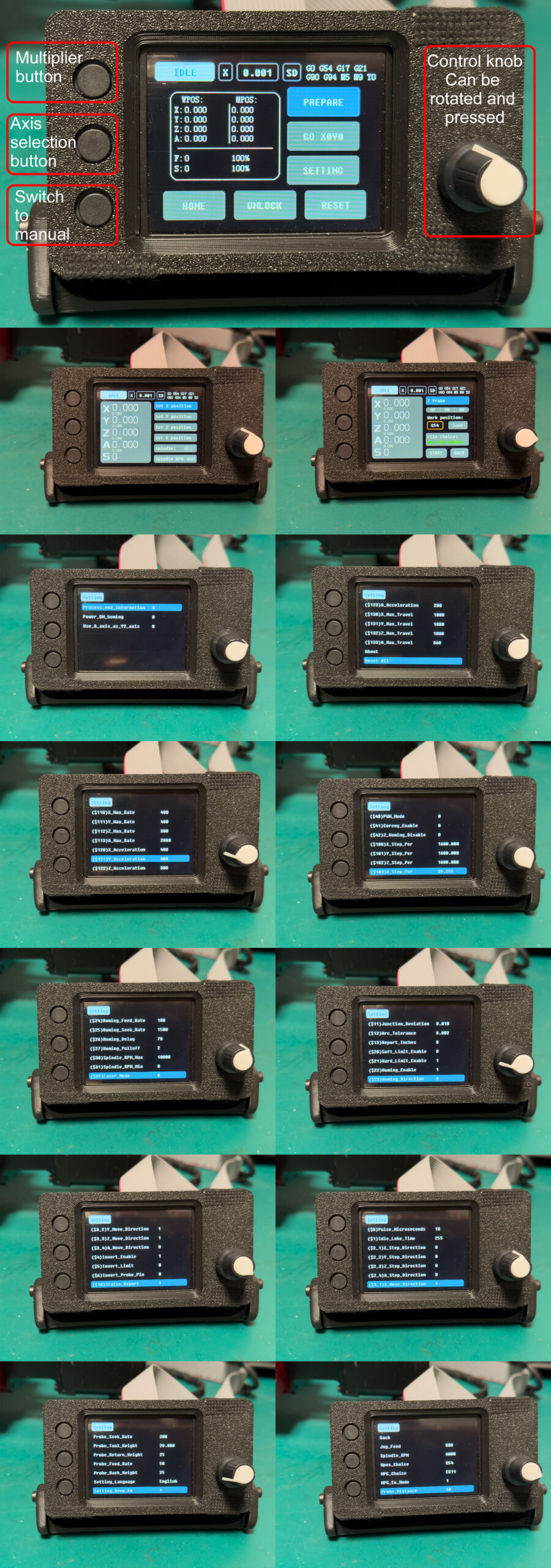
Hardware Interface Overview
The CNC controller features:
- 3 physical function buttons on the left
- Multiplier button
- Axis selection button
- Manual mode switch
- One rotary control knob on the right
- Rotate to navigate menus or adjust values
- Press to confirm selections
This combination allows fast, precise control without the need for a keyboard, mouse, or external computer during operation.
Main Status Screen
The main screen provides real-time machine status, including:
- **Machine position (MPos) and Work position (WPos)
- X / Y / Z / A axes supported
- Feed rate (F) and spindle speed (S) percentage
- Current system state (Idle / Run / Hold)
From this screen, users can quickly:
- Home the machine
- Unlock axes
- Reset alarms
- Enter preparation and settings menus
This layout is optimized for quick checks and safe operation during machining.
Manual Control & Jogging
In manual mode, the controller allows precise jogging of each axis:
- Select X / Y / Z / A axis using the axis button
- Adjust step size with the multiplier button(0.001/0.01/0.1/0.5mm)
- Rotate the knob to move the axis incrementally
This is ideal for:
- Tool setup
- Workpiece alignment
- Zeroing work coordinates
- Learning CNC motion as a beginner
G-code Execution via SD Card
All CNC machining files are loaded via SD card.
Workflow:
- Generate G-code using standard CAD/CAM software
(Fusion 360, SolidWorks CAM, UG, Kiri:Moto, etc.) - Save the file to an SD card
- Insert the SD card into the CNC controller
- Select and run the file directly from the screen
This offline workflow ensures:
- Stability and reliability
- No need for a constantly connected PC
- Clean, workshop-friendly operation
Settings & Advanced Configuration
The settings menus give users access to detailed CNC parameters, including:
- Axis travel limits
- Steps per millimeter
- Feed rate and acceleration
- Motor direction and enable logic
- Homing behavior
- Probe settings
- Spindle RPM configuration
These parameters allow:
- Fine tuning for accuracy
- Customization for upgrades (A-axis, different motors, etc.)
- Long-term expandability as users gain experience
Advanced users will appreciate the depth of control, while beginners can rely on default presets.
Designed for Expansion
The interface already supports:
- **3-axis CNC (X/Y/Z)
- **4th axis (A-axis rotary table)
This means the K1 CNC system is ready to grow with you — from basic milling and drilling to indexed or continuous rotary machining.
Final Thoughts
The K1 CNC control system is designed with one goal in mind:
Make CNC accessible, powerful, and upgradeable on a true desktop mill.
Whether you are:
- New to CNC and learning step by step
- A maker upgrading from manual milling
- An experienced user looking for a compact CNC platform
The K1 CNC interface provides the tools you need — without unnecessary complexity.
More demonstration videos and detailed walkthroughs of the control system will be shared in upcoming updates.
Stay tuned 🚀
KUJIETOOL Team